Showing posts with label Atari. Show all posts

Sunday, June 7, 2026

First weekend in June

"First weekend in June", is the same thing as me saying "I went to the Illinois Game Con". I had other alternatives this weekend I entertained. One, I could have gone to Chicago for a TI-99/4A user group meeting. Or two, I could have gone to Marion Kentucky for their big annual rock and mineral show. But my Son and my oldest daughter wanted me to join them at the Illinois Game Con, so I spent time with them there like I do almost every year since it first started. As previous years, I had a goal, and I achieved it. My goal was to see if I could again find an old computer system that I did not own. Particularly I was looking for an old Atari computer like the 400, 800, 600XL, 800XL, or the 130XE. And I was looking for it to be a $100 or less. I checked that box also. I found a box laying on the floor under a table. In it was an Atari 800XL with a 1080 disk drive, 3 Atari 8bit cartridges, 4 joysticks, 4 paddles, and a bunch of manuals. I asked how much and they said $100. I asked if it worked and they replied they had no idea. I asked if they would go to $90 and they said $95... Felt it was way worth the risk. Did not need the paddles or joysticks. I have SOOOO many as it is. But the manuals themselves intrigued me.

I also found a table selling almost nothing but dice, so I ended up making a purchase there too - of special DM dice set.

Drive and 800XL


The RF modulator does not work, but the cool thing about the Atari 800XL is that the computer comes with both an RF modulation video output and an S-video output.  I just happen to also have a S-video setup for my TI-99/4As so I hooked that up and the display worked!  Not a loss there for me as I 100% prefer S-Video and wished I had that option for my Tandy CoCo.  For the CoCo, I had to purchase the RF to HDMI modules that is in this photo above.  But to my surprise, my working video is welcomed by an unpleasant RAM failure.

I reached out to Facebook.  If the memory is socketed, this could be an easy fix. So I opened the 800xl up to see if the memory was socketed.  They are not.
A couple of people suggested to me that a bad power supply could cause this issue.  So I'm going to try purchasing a USB to Atari computer power supply first and see if that fixes the issue.  Crossing my fingers.  If the new power supply works, I got a heck of a great deal this weekend.  If it does not, not such a good deal. 

Oh, by the way, the dice I picked up.


Monday, April 27, 2026

New hardware project - my computer desk

I have 5 to 7 computers on my desk at any given time. With literal, physical desktop space being sparse, I have decided to do something that I think most would find odd. I'm going to take my Atari and my C64 and put them in a tower.


I will need a mechanism that will allow the two boards to share a single keyboard and a way to possibly power each independently.


I'll leave my primary Tandy CoCo2 and TI-99/4A alone of course.

I also need a tape cassette cable for the Tandy Coco so I can backup and restore code to my file server. 

Thursday, April 23, 2026

WAR IRON of the Red Clan

I'm going to do something I have never tried before, to make a game in Tandy's SG24 mode.  This will be a major difference in the development path I'm taking with the TI-99/4A, C64, and Atari 8-bit.  Those three system's graphics are being done with 8x8 bitmap pixels.


Tuesday, March 31, 2026

what is the deal with 80s computer keyboards

I hear social media video blogger repeat over and over that there was not a keyboard standard in the 70s and 80s for home computers. This unfortunately is true - kinda. There were really two loose standards. How do I know? First, I own quite a few computers from the 80s. It was IBM PC that broke the simi-standard and then redefined the overall standard by "winning" the PC wars.

So what was the standard layout before IBM changed it all?

First there is What I call Standard I - This was used by majority of the early 70-80s home computers

1) QWERTY keyboard like most type-writters

2) Specific characters associated with SHIFT and numbers


(Photo of a Commodore 64 keyboard)


(Photo of a Tandy CoCo 2 keyboard)

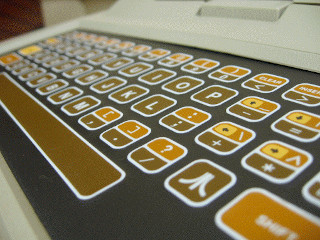
(Photo of an Atari 130XE keyboard)

Above the 1=!, 2=", 3=#, 4=$, 5=%, 6=&, 7=', 8=(, 9=)

Who adhered to this Standard I:
- Amstrad
- Apple I and II
- Atari (400, 800, 800XL, 130XE,  ect) - *Mostly*
- Commodore (PET, Vic 20, C64)
- Dragon (32 and 64 computers)
- Tandy (Model 1, Model 2, Model 3, Model 4, Coco, CoCo2, CoCo3 and others)

Probably others were included.

Anyone that does retro programming on these systems knows it is an adjustment finding the quote above the '2' key.

Atari put a '@' with the 8 and shifted the '(' and ')' over one place.

Where did these companies come up with this format. Many decades of typewriters before them. This was much of their layout.


Standard II
Who did not use Standard I, but the Standard II? 

- Later Apple computers and Macintosh. 
- Later Atari computers (ST line), 
- Later Commodores (Amiga line), 
- all IBM computers and most compatibles like Tandy 1000 line. 
- Coleco Adam
- All Texas Instrument computers.  

IBM came up with this design, which may have influenced later keyboard's such as the Apple IIe's/Macintosh, the Commodore Amigas and Atari STs.

With the Apple IIe, Apple changed some keys around like the 2 key to be associated with @ like the IBM.


Texas Instruments TI-99/4A keyboard

What is the Standard II number line layout?

1=!, 2=@, 3=#, 4=$, 5=%, 6=^, 7=, 8=*, 9=(, 0=)

Somehow people were swayed into believing the IBM PC was superior to the computers of the late 80s.  Really was not true, but perception often wins.   As PC clones became the norm, so did this keyboard layout.


Saturday, March 28, 2026

80s BASIC


I'm currently reprogramming a game I did before called Seven/Eleven. The game looked a little dull so I'm remaking all the interfaces. This made me realize how much I enjoy some 80s BASICs over others.

Here is a list of my Favorite 80's BASICs that I use fairly regular, from favorite to least favorite.

1 TI-99 Extended BASIC

2 TI-99 BASIC

3 Tandy Extended Color BASIC 2.0

4 Tandy Extended Color BASIC 1.1

5 Tandy BASIC

6 Commodore BASIC V2

7 Atari BASIC

8 AppleSoft II BASIC

I should note that my first exposure to Tandy BASIC and Apple II BASIC was mostly as a teenager through public schools.

Why TI at the top? Most control in the easiest way. I really think if most companies and found someone better than Microsoft to develop their BASIC language, they could have been much better. What I like about Tandy and Commodore is that what ever they lack in BASIC features, they are quite hackable. It is possible to get to modes the physical computer could do that were not addressed in the BASIC environment.  Really, that is why Microsoft had the PEEK and POKE commands because there was so much they did not know how to translate into BASIC usefully.  And the way Microsoft used their graphics modes were so over complicated and stupid.  Really just limiting.  For the most part, programmers that understood the hardware capabilities and used assembler/machine language were really able to make the most of these computers.

It is not like TI-99 Extended BASIC was perfect as there were feature that were not addressed until the late 80s and early 90s with Super Extended BASIC by third party developers - but by that time most of the world had moved on from TI-99.  TI-99 popularity now is just mainly from people that remember fondly how much they enjoyed using TI-99 in the late 70s and early 80s.

Sadly the two most fun computers  TI and Tandy were the two most physically limiting computers.  TI-only made a 32K memory expansion for their computer that was shipped out with 16k.  TI also made their computers slower than need be by running code in video memory.  Tandy did not provide a dedicated 3 voice or better sound chip and a video processing chip that only handled 9 colors on both the CoCo 1 and 2. 

TI did make up in other areas though.  Best built in sprite capabilities, 16-bit processor, and S-Video output.  Tandy did make up for it with the easiest, but powerful, graphics and music programming commands. With some hacking past Microsoft's made limitations, graphically Tandy could put out some nice graphics with only 9 colors. 

Tuesday, October 7, 2025

Bad Apple on 80 computers!!!!

Bad Apple!

Each of these videos of computer renders keeps getting better.  

Really surprised how bad the C64 version is.

Impressed with what could be done with the Atari 2600
Animation is smooth, although not surprising blocky.

Best of these old computers is the TI-99/4a

Atari 2600
https://www.youtube.com/watch?v=Ko9ZA50X71

C64
https://www.youtube.com/watch?v=OsDy-4L6-tQ

Atari 8-bit computer
https://www.youtube.com/watch?v=BjNm04oCdYc

zx spectrum
https://www.youtube.com/watch?v=cd5iEeIe7L0

TI-99/4A
https://www.youtube.com/watch?v=vx__aAdm4wQ

Original video
https://www.youtube.com/watch?v=FtutLA63Cp8


Sunday, June 8, 2025

Some system photos from this weekend.

Atari 800

Atari 800XL, Atari 130XE, Atari XEGS
Magnavox Odyssey 2
Texas Instruments TI-99/4A

Bally Computer System Videocade

Thursday, May 8, 2025

Just showing the progress on the slot machine game.

I'm continuing to try to make all the versions of my slot machine game better and as much alike between the computers.  I have a "working" version for Atari 8-bit, but still defining the graphics.

Here is what the C64 Version currently looks like:


Here is what the TI-99/4A version looks like:


Tuesday, May 6, 2025

comparison of 80s computers with BASIC


I have completed the simple version of the slot machine for the C64. But while programming this, I have learned that although it was the #1 selling computer of all time, it really was not as good as the computers that came out at the time. I have started documenting these short comings of the C64 BASIC.

First lets talk about variables. C64 could only have 2 character variables. I was stumped by this. This is a horrible flaw.

Here is a very simple demo with Atari XE computer and the TI-99/4A


Very simple and what one would expect. Here is the same code on the C64.

See what is going on here? All three variables are the same on the C64


So, if I make three variables; SB1, SB2, and SB3... to the C64, they are all the same variable - SB.
I can't believe this was OK for back in 1984. But in all fairness, Apple II computers had the same issue.
That said, I always hated programming on the Apple II back in the day and I don't remember this issue either.

The next issue was the limitation of the CHR$(X) that could be used on a single print line. this could be quite helpful with old BASIC. More than 5 on the C64, and the line would not PRINT. Luckily there is a work around for this. End that line with a ";" and then continue with another PRINT statement .


Above is a screen shot of Atari 8-bit computer showing that it can string along beyond what the C64 can.

My third beef with the C64 BASIC is that you can not add remarks on a DATA statement.  I'm pretty sure any other command that I found you can, but not on the DATA.  This is the one statement that could really use such a feature.

120 DATA 00,255,255,14,14,28,56,56

work around is just adding a REM on the line above.  But the whole idea of adding one cat'ed on the end is to make useful notes for each line that might need a comment. 

In all fairness the TI-99/4A will not allow REM at the end of the line

Saturday, April 5, 2025

Updating code


I'm currently working on two areas for the DDD project. I'm plugging along on the Linux, Windows, and MacOS software. These are becoming a very complicated software. Because of this, a lot of documentation is being created to for planning the code.

Secondly, I'm looking at making the Atari and C64 dice app look better. It is not that both system are not capable, they definitely are. It is just how the two companies chose to do graphics. The TI-99 is just easier and more flexible to do graphics with. A lot of the concepts are the same, but working with binary to hexadecimal is easier than the conversions of binary to decimal. And TI-99's ability to intermix text and graphics make a project like this easier. Below is calculating one line of graphics on Atari and C64.
So for the C64 I would have to POKE 127 at certain location in video.

For the same graphic line created on the TI-99, the value you would use would be 7F based on this chart

Worse yet, I don't know of a method of intermixing text and graphic like is default with the TI-99.  so each dice outcome has to be drawn.  Even with Windows and Linux, if I needed to, I could place text on the graphic.

Friday, March 28, 2025

New site dedicated to DDD

This is a little update. As I continue writing software for D&D with the Dragons, Druids, and Dice project - I have created a dedicated web page for this project. 

https://mrgibson.com/dragons-druids-n-dice.php

Here I'm sharing code, screen shots, executables. 

My development for the C64 has be sparce as there are some pretty good development platforms for most systems, but not so much for the C64.  For physical hardware, I'm using a "TheC64" and there is not another real way for me to write and test the software easily.  

For the really old platforms, the TI-99 looks the best and mainly I understand development on it the most.

For Linux, Windows, and MacOS - I'm finding myself using tool sets that I have written before to perform many different types of tasks.  Really, by far, Linux is the easiest platform to develop with. 


Saturday, March 15, 2025

Dragons, Druids, and Dice 1.2 for the TI-99/4A

I finalized Dragons, Druids, and Dice 1.2 for the TI-99/4A (March 15, 2025). I will put out the Atari XL/XE version next (March 16, 2025).


Here is a screen shot from the TI-99 version of 1.2


Screen shot of the Atari version of 1.2


Thursday, March 13, 2025

Memory struggle

I have really struggled to do ROM to RAM mapping on the C64 and Atari 8-bit. The processes is very much alike, between the two systems. The problem is making the process consistent. Additionally, re-running the same program with the same memory calls causes crashes. I have in the time being just made 1.1 versions very simple. I wanted to use the same graphics that I made for the TI-99/4A. In theory that is possible. I just have not been able to consistently do so.

My compromise:

Instead of using this code:

100 MEMTOP=PEEK(106) 
110 GRTOP=MEMTOP-4 
120 POKE 106,GRTOP

140 GRAPHICS 0 
160 CHROM=PEEK(756)*256 
170 CHRAM=GRTOP*256 

500 FOR N=0 TO 1023 
510 POKE CHRAM+N,PEEK(CHROM+N) 
520 NEXT N 

540 POKE 756,GRTOP

Wednesday, March 12, 2025

Preview screenshots of Dragons, Druids, and Dice 1.1

Just posting some progress screen shots of Dragons, Druids, and Dice 1.1 shown on TI-99/4A 


Screen shot of Atari 800XL


Monday, March 10, 2025

Simple D&D dice roller for C64, Atari XL, and TI-99/4A (Ver 1.0)

I only tested this code with the C64, Atari XL and TI-99/4a (standard basic).
This will likely work on more platforms with little or no modifications
See the note on the bottom for the TI-99/4A.

Atari 800XL output


TI-99/4A output

Code for C64 AND ATARI

10 PRINT "DRAGON AND DICE"
20 PRINT "A) ROLL 4D"
30 PRINT "B) ROLL 6D"
40 PRINT "C) ROLL 8D"
50 PRINT "D) ROLL 10D"
60 PRINT "E) ROLL 12D"
70 PRINT "F) ROLL 20D"
80 PRINT "G) ROLL FOUR 6D"
85 PRINT "Z) QUIT"
90 INPUT A$
100 IF A$="A" THEN 200
110 IF A$="B" THEN 300
120 IF A$="C" THEN 400
130 IF A$="D" THEN 500
140 IF A$="E" THEN 600
150 IF A$="F" THEN 700
160 IF A$="G" THEN 800
170 IF A$="Z" THEN 1000
180 PRINT "----"
190 GOTO 10
200 D=INT(1+4*RND(1))
210 PRINT "YOU ROLLED A "
220 PRINT D
230 PRINT "WITH 4D"
240 PRINT "--"
250 GOTO 10
300 D=INT(1+6*RND(1))
310 PRINT "YOU ROLLED A "
320 PRINT D
330 PRINT "WITH 6D"
340 PRINT "--"
350 GOTO 10
400 D=INT(1+8*RND(1))
410 PRINT "YOU ROLLED A "
420 PRINT D
430 PRINT "WITH 8D"
440 PRINT "--"
450 GOTO 10
500 D=INT(1+10*RND(1))
510 PRINT "YOU ROLLED A "
520 PRINT D
530 PRINT "WITH 10D"
540 PRINT "--"
550 GOTO 10
600 D=INT(1+12*RND(1))
610 PRINT "YOU ROLLED A "
620 PRINT D
630 PRINT "WITH 12D"
640 PRINT "--"
650 GOTO 10
700 D=INT(1+20*RND(1))
710 PRINT "YOU ROLLED A "
720 PRINT D
730 PRINT "WITH 20D"
740 PRINT "--"
750 GOTO 10
800 D1=INT(1+6*RND(1))
802 D2=INT(1+6*RND(1))
804 D3=INT(1+6*RND(1))
806 D4=INT(1+6*RND(1))
810 PRINT "YOU ROLLED A "
820 PRINT D1;" ";D2;" ";D3;" ";D4
830 PRINT "WITH FOUR 6D"
840 PRINT "--  --  --  --"
850 GOTO 10
1000 END

For the TI-99/4A computer, change the randomize calls with this format: 

D=INT(1+4*RND)
D=INT(1+6*RND)

Sunday, March 9, 2025

ugBASIC 1.17.1 RELEASED


ugBASIC 1.17.1 RELEASED!

A new version of ugBASIC, the open source isomorphic BASIC compiler, has been released.

This version for multiple compliable computer ports 

ATARI 400/800/XL/XEGS implements an improved DOJO protocol, allowing for multiplayer games thanks to the integration with FujiNet. It also contains numerous additional keywords, serial support, and specific optimizations for ATARI computers.

Full list of Atari supported:
Atari 400, 
Atari 800
Atari 1200XL, 
Atari 130XE, 
Atari 600XL, 
Atari 65XE, 
Atari 800XE, 
Atari 800XL, 
Atari XEGS


Commodore 64 and Commodore VIC-20, in addition to containing numerous corrections and implementations, has many new instructions related to joystick movement, text positioning and character detection. It is now possible to define functions and perform sums and counts on arrays.


ugBASIC is a cross compiler for Linux and Windows, for writing games in the BASIC language, running on dozens of different home computers and 8-bit consoles. There is also a convenient integrated IDE for Microsoft Windows and even a sandbox, if you do not want to install anything.


Saturday, February 8, 2025

Fun Coding project

Currently I'm writing some code for C64, Atari 8-bit, and T-999/4A for advanced graphic functions. The C64 will be based off these BASIC commands.


I'm still working out the details for the TI-99/4A and GW-BASIC for early PCs

Saturday, January 11, 2025

Ball Bounce - Saturday BASIC coding Exercise

Here is my Saturday programming exercise. 

X is the ball's X position
DX is the ball's X direction
Y is the ball's Y position
DY is the ball's Y direction

Positioning the ball on Atari computer
170 POSITION X,Y
175 PRINT CHR$(20)

Character 20 being the ball.

Positioning the ball on C64
170 POKE 1024 + X + 40*Y,81

81 being the ball.

Positioning the ball on TI-99
170 CALL HCHAR(Y,X,81)

Positioning the cross on the Apple II
161 PLOT X, Y
162 PLOT X-1,Y+1
163 PLOT X,Y+1
164 PLOT X+1,Y+1
165 PLOT X,Y+2

The TI uses Y,X coordinates where C64 and Apple use X,Y coordinates.

Atari and C64 both have predefined ball characters.  TI-99 and Apple does not.
I'm using character 81 as the ball on C64  - 20 on Atari
I'm rewriting character 81 and drawing it as a ball on the TI.
There is no simple middle ground with the Apple when doing graphic.
I simply slapped 5 blocks together with the plot command in low res
graphics.

Using TI-99 Extended BASIC, I could have shortened up the TI-99
code a lot, but wanted the code to work with both versions of 
BASIC.

For that matter, I could have shortened up all the BASIC code by
CATing code on the same lines, but I'm not a fan of that.  Too 
much and the code stops being easily readable.

I have been programming the far majority of my life.  
I still feel the same about these 4 platforms of the 80s.
TI-99 Extended #1, Atari 2nd, C64 3rd, and Apple II still sucks.


On to the Code!!

The Atari Code First

100 REM CLEAR SCREEN
110 PRINT CHR$(125)
120 GRAPHICS 0 : POKE 752,1
140 X = 1 
145 Y = 1
150 DX = 1 
155 DY = 1
160 REM DISPLAY BALL
170 POSITION X,Y
175 PRINT CHR$(20)
180 REM LINE 190 SLOW CODE DOWN
190 FOR T = 1 TO 50 
195 NEXT T
200 POSITION X,Y
205 PRINT " "
210 X = X + DX
220 IF X <= 0 THEN DX=-DX
225 IF X >= 34 THEN DX=-DX 
230 Y = Y + DY
240 IF Y <= 0 THEN DY=-DY
245 IF Y >= 22 THEN DY=-DY 
250 GOTO 160

The C64 BALL BOUNCE code!

100 REM CLEAR SCREEN
110 PRINT "{CLR/HOME}"
120 REM BG L-GREEN AND YELLOW BORDER
130 POKE 53280,7 
135 POKE 53281,13
140 X = 1 
145 Y = 1
150 DX = 1 
155 DY = 1
160 REM DISPLAY BALL
170 POKE 1024 + X + 40*Y,81
180 REM LINE 190 SLOW CODE DOWN
190 FOR T = 1 TO 30 
195 NEXT
200 POKE 1024 + X + 40*Y,32
210 X = X + DX
220 IF X <= 0 OR X >= 39 THEN DX = -DX 
230 Y = Y + DY
240 IF Y <= 0 OR Y >= 24 THEN DY = -DY 
250 GOTO 160

The TI-99 BALL BOUNCE code!

100 CALL CLEAR
110 CALL SCREEN(4)
120 CALL CHAR(81,"3C7EFFFFFFFF7E3C")
140 X = 1 
145 Y = 1
150 DX = 1 
155 DY = 1
160 REM DISPLAY BALL
170 CALL HCHAR(Y,X,81)
180 REM LINE 190 SLOW CODE 
190 FOR T = 1 TO 30 
195 NEXT T
200 CALL HCHAR(Y,X,32)
210 X = X + DX
220 IF X < 2 THEN 300
225 IF X > 31 THEN 300 
230 Y = Y + DY
240 IF Y < 2 THEN 320
245 IF Y > 23 THEN 320 
250 GOTO 160
300 DX =-DX
310 GOTO 160
320 DY =-DY
330 GOTO 160

Apple II PLUS BOUNCE code! 
It is fairly difficult in GR or HGR to make a ball.

100 REM CLEAR SCREEN
120 GR
140 X = 17 
145 Y = 5
150 DX = 1 
155 DY = 1
160 COLOR = 6
161 PLOT X, Y
162 PLOT X-1,Y+1
163 PLOT X,Y+1
164 PLOT X+1,Y+1
165 PLOT X,Y+2
180 REM LINE 190 SLOW CODE DOWN
190 FOR T = 1 TO 30 
195 NEXT T
200 COLOR = 0
201 PLOT X, Y
202 PLOT X-1,Y+1
203 PLOT X,Y+1
204 PLOT X+1,Y+1
205 PLOT X,Y+2
210 X = X + DX
220 IF X <= 2 OR X >= 37 THEN DX = -DX 
230 Y = Y + DY
240 IF Y <= 2 OR Y >= 37 THEN DY = -DY 
250 GOTO 160
Really, Atari does the best job. TI-99 is the easiest to program. Apple II is the "worsteth" of the four.

Thursday, November 28, 2024

Hello World Examples from different 80's platforms

Programming in the 80's, every platform had to be differnt.
Odyssey2 Computer Intro! Assembler has multiple ways of 
displaying Hello World, here is one.

00 6B LDV.B.00  ;Load display register B with position 00
01 00
02 60 LDV.0.00  ;load register 0 with NULL
03 00
04 6C LDV.C.12  ;Load data space register C with step 12
05 12
06 09 MOV       ;Move data space to accumulator
07 30 BEQ.0.24  ;If NULL goto end
08 24
09 0B OTA       ;Display accumulator
10 12 GTO.06    ;go back to move at step 06   
11 06
12 1D           ;H  Start of data space
13 12           ;E
14 0E           ;L
15 0E           ;L
16 17           ;O
17 0C           ;space
18 11           ;W 
19 17           ;O
20 13           ;R
21 0E           ;L
22 1A           ;D
23 00           ;NULL  end of string
24 00 NOP       ;No opperation, just a place to land

TI-99/4 and TI-99/4A BASIC

10 CALL CLEAR
20 PRINT "HELLO WORLD"


ATARI 8-bit (400/800/800XL/130XE) BASIC

10 PRINT CHR$(125)
20 PRINT "HELLO WORLD"

Commodore VIC 20 BASIC

10 PRINT "{CLRSCN}"
20 PRINT "HELLO WORLD"

Commodore 64 BASIC

10 PRINT CHR$(147)
20 PRINT "HELLO WORLD"

IBM AT GW-BASIC

10 CLS
20 PRINT "HELLO WORLD"

Wednesday, November 20, 2024

Adding 6th and 7th computer to my lab


New to the lab, but not new to the household is the Apple Mac. This Apple computer has not been used in a while, taken out of storage, and dusted off.


Also new to the lab, but not household, an RCA computer. I know nothing about this RCA, just found it in my old computer storage. At one time I must have purchased it for one of my daughters as it is hot pink. lol It is a "Viking Pro RCA"


So my lab now has three Windows boxes, RCA (Android Linux), TI-99/4A, Atari 400, and an Apple.


I have also added a backend ethernet network and file server to easily share files between the machines without being public and using up wi-fi resources.


Plus setting up a new KVM. the HP server, RCA, and Apple will share a large monitor while the TI-99, Atari, HP laptop and Lenovo laptop share a monitor.


Best of.... Fantasy and Dungeon Crawlers for TI-99/4A

Best of.... Fantasy and Dungeon Crawlers for TI-99/4A Dungeons of Asgard Single player game. This is a *great* game once you get to know all...