Showing posts with label C64. Show all posts

Monday, April 27, 2026

New hardware project - my computer desk

I have 5 to 7 computers on my desk at any given time. With literal, physical desktop space being sparse, I have decided to do something that I think most would find odd. I'm going to take my Atari and my C64 and put them in a tower.


I will need a mechanism that will allow the two boards to share a single keyboard and a way to possibly power each independently.


I'll leave my primary Tandy CoCo2 and TI-99/4A alone of course.

I also need a tape cassette cable for the Tandy Coco so I can backup and restore code to my file server. 

Thursday, April 23, 2026

WAR IRON of the Red Clan

I'm going to do something I have never tried before, to make a game in Tandy's SG24 mode.  This will be a major difference in the development path I'm taking with the TI-99/4A, C64, and Atari 8-bit.  Those three system's graphics are being done with 8x8 bitmap pixels.


Tuesday, March 31, 2026

what is the deal with 80s computer keyboards

I hear social media video blogger repeat over and over that there was not a keyboard standard in the 70s and 80s for home computers. This unfortunately is true - kinda. There were really two loose standards. How do I know? First, I own quite a few computers from the 80s. It was IBM PC that broke the simi-standard and then redefined the overall standard by "winning" the PC wars.

So what was the standard layout before IBM changed it all?

First there is What I call Standard I - This was used by majority of the early 70-80s home computers

1) QWERTY keyboard like most type-writters

2) Specific characters associated with SHIFT and numbers


(Photo of a Commodore 64 keyboard)


(Photo of a Tandy CoCo 2 keyboard)

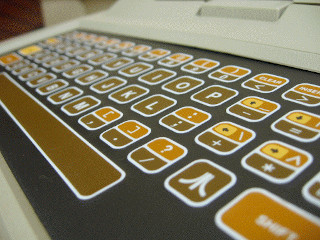
(Photo of an Atari 130XE keyboard)

Above the 1=!, 2=", 3=#, 4=$, 5=%, 6=&, 7=', 8=(, 9=)

Who adhered to this Standard I:
- Amstrad
- Apple I and II
- Atari (400, 800, 800XL, 130XE,  ect) - *Mostly*
- Commodore (PET, Vic 20, C64)
- Dragon (32 and 64 computers)
- Tandy (Model 1, Model 2, Model 3, Model 4, Coco, CoCo2, CoCo3 and others)

Probably others were included.

Anyone that does retro programming on these systems knows it is an adjustment finding the quote above the '2' key.

Atari put a '@' with the 8 and shifted the '(' and ')' over one place.

Where did these companies come up with this format. Many decades of typewriters before them. This was much of their layout.


Standard II
Who did not use Standard I, but the Standard II? 

- Later Apple computers and Macintosh. 
- Later Atari computers (ST line), 
- Later Commodores (Amiga line), 
- all IBM computers and most compatibles like Tandy 1000 line. 
- Coleco Adam
- All Texas Instrument computers.  

IBM came up with this design, which may have influenced later keyboard's such as the Apple IIe's/Macintosh, the Commodore Amigas and Atari STs.

With the Apple IIe, Apple changed some keys around like the 2 key to be associated with @ like the IBM.


Texas Instruments TI-99/4A keyboard

What is the Standard II number line layout?

1=!, 2=@, 3=#, 4=$, 5=%, 6=^, 7=, 8=*, 9=(, 0=)

Somehow people were swayed into believing the IBM PC was superior to the computers of the late 80s.  Really was not true, but perception often wins.   As PC clones became the norm, so did this keyboard layout.


Saturday, March 28, 2026

80s BASIC


I'm currently reprogramming a game I did before called Seven/Eleven. The game looked a little dull so I'm remaking all the interfaces. This made me realize how much I enjoy some 80s BASICs over others.

Here is a list of my Favorite 80's BASICs that I use fairly regular, from favorite to least favorite.

1 TI-99 Extended BASIC

2 TI-99 BASIC

3 Tandy Extended Color BASIC 2.0

4 Tandy Extended Color BASIC 1.1

5 Tandy BASIC

6 Commodore BASIC V2

7 Atari BASIC

8 AppleSoft II BASIC

I should note that my first exposure to Tandy BASIC and Apple II BASIC was mostly as a teenager through public schools.

Why TI at the top? Most control in the easiest way. I really think if most companies and found someone better than Microsoft to develop their BASIC language, they could have been much better. What I like about Tandy and Commodore is that what ever they lack in BASIC features, they are quite hackable. It is possible to get to modes the physical computer could do that were not addressed in the BASIC environment.  Really, that is why Microsoft had the PEEK and POKE commands because there was so much they did not know how to translate into BASIC usefully.  And the way Microsoft used their graphics modes were so over complicated and stupid.  Really just limiting.  For the most part, programmers that understood the hardware capabilities and used assembler/machine language were really able to make the most of these computers.

It is not like TI-99 Extended BASIC was perfect as there were feature that were not addressed until the late 80s and early 90s with Super Extended BASIC by third party developers - but by that time most of the world had moved on from TI-99.  TI-99 popularity now is just mainly from people that remember fondly how much they enjoyed using TI-99 in the late 70s and early 80s.

Sadly the two most fun computers  TI and Tandy were the two most physically limiting computers.  TI-only made a 32K memory expansion for their computer that was shipped out with 16k.  TI also made their computers slower than need be by running code in video memory.  Tandy did not provide a dedicated 3 voice or better sound chip and a video processing chip that only handled 9 colors on both the CoCo 1 and 2. 

TI did make up in other areas though.  Best built in sprite capabilities, 16-bit processor, and S-Video output.  Tandy did make up for it with the easiest, but powerful, graphics and music programming commands. With some hacking past Microsoft's made limitations, graphically Tandy could put out some nice graphics with only 9 colors. 

Thursday, October 9, 2025

My GLASS spreadsheet page

 Since I have been putting so much effort writing spreadsheet software, I have created a new launch page for it.   https://mrgibson.com/GOS/index.php

I'm going to be posting GLASS for Linux and MacOS next, then work on C64 version of GSS.


Tuesday, October 7, 2025

Bad Apple on 80 computers!!!!

Bad Apple!

Each of these videos of computer renders keeps getting better.  

Really surprised how bad the C64 version is.

Impressed with what could be done with the Atari 2600
Animation is smooth, although not surprising blocky.

Best of these old computers is the TI-99/4a

Atari 2600
https://www.youtube.com/watch?v=Ko9ZA50X71

C64
https://www.youtube.com/watch?v=OsDy-4L6-tQ

Atari 8-bit computer
https://www.youtube.com/watch?v=BjNm04oCdYc

zx spectrum
https://www.youtube.com/watch?v=cd5iEeIe7L0

TI-99/4A
https://www.youtube.com/watch?v=vx__aAdm4wQ

Original video
https://www.youtube.com/watch?v=FtutLA63Cp8


Thursday, August 28, 2025

Let's talk C64 Ultimate.

I'm excited about two new computers that are remakes of old.  First of the two is the C64 Ultimate.  If I buy one, it will only be one of them.  So first lets look at Commodore's offering. 

Yes, there is another new C64 on the market, and this time from Commodore themselves.  The Commodore C64 Ultimate.


From the photos, we see it comes with Ethernet, USB, and HDMI video output.  The keyboard looks pretty close to the original.

We also know the new C64 will have GEOS installed. That is awesome, but will the new Commodore C64 come with a web browser like "The Wave"?  From the Commodore website, show geoWrite running. But will the C64 Ultimate come packaged with a word processor like geoWrite?

From the Commodore website:

Play 10,000+ original games with more RAM & 48Mhz Turbo mode! (128MB DDR2 RAM, 16MB NOR flash)(Core: AMD Xilinx Artix-7 FPGA)

Plug in dusty old cartridges, CRT TVs, datasettes, or disk drives - it all works.‡

No disk drive needed: Load games using the File Browser from the supplied cassette-style USB thumbdrive, packed with 50+ titles - full games, licensed classics, music, demos, and Commodore's exclusive new sequel to our first ever game - Jupiter Lander. Or add your own!
Not just reborn but upgraded: More memory & faster speed options, multiple SID sound chips (add 2 original ones or use 8 x virtual SIDs!), keyboard macros, even modern printer support!

Enjoy HDMI clarity, Wi-Fi game transfer, USB convenience.

Hidden inside: the autographs/names of Commodore 64 creators past and present - including Albert 'Father of the Commodore 64' Charpentier - etched forever in the motherboard copper.*

Thursday, May 8, 2025

Just showing the progress on the slot machine game.

I'm continuing to try to make all the versions of my slot machine game better and as much alike between the computers.  I have a "working" version for Atari 8-bit, but still defining the graphics.

Here is what the C64 Version currently looks like:


Here is what the TI-99/4A version looks like:


Tuesday, May 6, 2025

comparison of 80s computers with BASIC


I have completed the simple version of the slot machine for the C64. But while programming this, I have learned that although it was the #1 selling computer of all time, it really was not as good as the computers that came out at the time. I have started documenting these short comings of the C64 BASIC.

First lets talk about variables. C64 could only have 2 character variables. I was stumped by this. This is a horrible flaw.

Here is a very simple demo with Atari XE computer and the TI-99/4A


Very simple and what one would expect. Here is the same code on the C64.

See what is going on here? All three variables are the same on the C64


So, if I make three variables; SB1, SB2, and SB3... to the C64, they are all the same variable - SB.
I can't believe this was OK for back in 1984. But in all fairness, Apple II computers had the same issue.
That said, I always hated programming on the Apple II back in the day and I don't remember this issue either.

The next issue was the limitation of the CHR$(X) that could be used on a single print line. this could be quite helpful with old BASIC. More than 5 on the C64, and the line would not PRINT. Luckily there is a work around for this. End that line with a ";" and then continue with another PRINT statement .


Above is a screen shot of Atari 8-bit computer showing that it can string along beyond what the C64 can.

My third beef with the C64 BASIC is that you can not add remarks on a DATA statement.  I'm pretty sure any other command that I found you can, but not on the DATA.  This is the one statement that could really use such a feature.

120 DATA 00,255,255,14,14,28,56,56

work around is just adding a REM on the line above.  But the whole idea of adding one cat'ed on the end is to make useful notes for each line that might need a comment. 

In all fairness the TI-99/4A will not allow REM at the end of the line

Friday, May 2, 2025

Started on C64 slots

I know between Sept 2024 and Oct 2024 I would start programming a slot machine game for the C64.

Well, I have officially started. Just wanted to share the start of the design and code.

 .
 Number 7 -  

1234|1234|1234|1234
    |    |    |      1  00 00
 xxx|xxxx|xxxx|xxxx  2  7F FF
 xxx|xxxx|xxxx|xxxx  3  7F FF
 xxx|    |    |xxx   4  70 0E
 xxx|    |    |xxx   5  70 0E
    |    |   x|xx    6  00 1C
    |    |  xx|x     7  00 38
    |    |  xx|x     8  00 38
______________________
    |    | xxx|      1  00 70
    |    | xxx|      2  00 70
    |    |xxx |      3  00 E0
    |   x|xx  |      4  01 C0
    |   x|xx  |      5  01 C0
    |  xx|xx  |      6  03 C0
    | xxx|xx  |      7  07 C0
    |    |    |      8  00 00

===============================================

Heart 

1234|1234|1234|1234
    |    |    |      1  00 00
    |    |    |      2  00 00
   x|xx  |  xx|x     3  1C 38
  xx|xxx | xxx|xx    4  3E 7C
 xxx|xxxx|xxxx|xxx   5  7F FE 
 xxx|xxxx|xxxx|xxx   6  7F FE 
 xxx|xxxx|xxxx|xxx   7  7F FE 
 xxx|xxxx|xxxx|xxx   8  7F FE 
____________________
  xx|xxxx|xxxx|xx    1  3F FC
   x|xxxx|xxxx|x     2  1F F8 
    |xxxx|xxxx|      3  0F F0
    | xxx|xxx |      4  07 E0
    |  xx|xx  |      5
    |   x|x   |      6
    |    |    |      7  00 00
    |    |    |      8  00 00


ROM 58(:), 59(;), 60(<), 61(=)   = number7 four colors - green, blue, black, red
ROM 26(z), 27([), 28(^), 29(])   = heart   red or black
ROM 35(#), 37(%), 38(&), 39(')   = lemon   yellow
ROM 40((), 41()), 42(*), 43(+)   - diamond red or black

71 rem number7

74 data 00,127,127,112,112,00,00,00
75 rem "00  7F  7F  70  70" - rom 58

79 data 00,255,255,14,14,28,56,56
80 rem "00  FF  FF 0E 0E 1C 38 38" - rom 59

84 data 00,00,00,01,01,03,07,00
85 rem "00 00 00 01 01 03 07" - rom 60

89 data 112,112,224,192,192,192,192,00
90 rem " 70  70  E0  C0  C0  C0  C0" - rom 61

91 rem heart
94 data  00,00,
95 rem  "00 00 1C 3E 7F 7F 7F 7F"

99  data 00,00,
100 rem "00 00 38 7C FE FE FE FE"

109 data
110 rem "3F 1F 0F 07 03 01"

119 data
120 rem "FC F8 F0 E0 C0 80"

207 rem Lemon
209 data 00,00,00,03,15,31,63,255
210 rem "00 00 00 03 0F 1F 3F FF"

219 data 00,00,00,192,
220 rem "00 00 00  C0 F0 F8 FC FF"

229 data 255
230 rem " FF 3F 1F 0F 03"

239 data 255
240 rem " FF FC F8 F0 C0"

380u rem Diamond
392 rem "00 01 03 07 0F 1F 3F 7F"
393 rem "00 80 C0 E0 50 A8 FC FE"
394 rem "7F 3F 1F 0F 07 03 01"
395 rem "FE FC F8 F0 E0 C0 80"
 
 .


Monday, April 28, 2025

I finally have something to show for the C64

I finally have something to show for the C64 version of Dragon, Druids, & Dice 1.2! I have the C64 version of DDD 1.2 done and with the same graphics as the TI-99/4A. This took way more work than I could have imagined.  Maybe if I had grown up with the C64, it would have been easier.

Above is what the C64 version looks like and here is what the TI-99/4A looks like:
Font looks different and I kept the C64's default blue font color.

During this whole programming ordeal, I have used and updated the following documentation:

C64 character manipulation:
https://mrgibson.com/c64basic2.php

TI-99/4A general character documentation (bottom):
https://mrgibson.com//TI/TIBASIC2.php

and lastly my general C64 BASIC document:
https://mrgibson.com/c64basic.php

I did have to shift a few things around, but most of the code is pretty close to each platform.

Here is an example of shifting from character to another between the two platforms.

119 for a=12656 to 12663: read ze: poke a,ze: poke a+1024,255-ze: next a
120 data 0,0,0,0,192,48,12,03
121 rem call char(97,"00 00 00 00 c0 30 0c 03")  swap 97 for c64 46 '.'


Tuesday, April 15, 2025

More on the C64 dice development

Here is an improved proof of concept for the C64. Still different from the TI-99/4A, 
but still the same concept and more detailed than yesterday's post.
So, so much more work than needed on the TI-99/4A just to get the same result
on the C64.

10 print chr$(147) 100 rem copy rom routine 105 for i=0 to 26: read x: poke 828+i,x: next i 110 data 169,000,160,208,133,095,132,096 : rem LDA #0; LDY #$D0; STA 95, STY 96 115 data 169,000,160,224,133,090,132,091 : rem LDA #0; LDY #$E0; STA 90; STY 91 120 data 169,000,160,064,133,088,132,089 : rem LDA #0; LDY #$40; STA 88; STY 89 125 data 076,191,163 : rem JMP $A3BF 130 rem COPY $D000-$DFFF -> $3000-$3FFF 135 rem move char set rom into ram 140 poke 56334,peek(56334) and 254 : rem INTERRUPT OFF 145 poke 1,peek(1) and 251 : rem CHAR SET ROM ON 150 sys 828 : rem START COPY 155 poke 1,peek(1) or 4 : rem CHAR SET ROM OFF 160 poke 56334,peek(56334) or 1 : rem INTERRUPT ON 165 poke 53272,peek(53272) and 240 or 12 : rem CHAR SET RAM AT $3000 170 rem rewrite char [ 175 for a=12504 to 12511: read ze: poke a,ze: poke a+1024,255-ze: next a 180 rem rewrite char # 185 for a=12568 to 12575: read ze: poke a,ze: poke a+1024,255-ze: next a 190 rem rewrite char & 195 for a=12592 to 12599: read ze: poke a,ze: poke a+1024,255-ze: next a 200 rem rewrite char ] 205 for a=12520 to 12527: read ze: poke a,ze: poke a+1024,255-ze: next a 210 rem rewrite char ( 215 for a=12608 to 12615: read ze: poke a,ze: poke a+1024,255-ze: next a 220 rem rewrite char ! 225 for a=12552 to 12559: read ze: poke a,ze: poke a+1024,255-ze: next a 230 rem rewrite char % 235 for a=12584 to 12591: read ze: poke a,ze: poke a+1024,255-ze: next a 240 rem rewrite char ) 245 for a=12616 to 12623: read ze: poke a,ze: poke a+1024,255-ze: next a 700 data 15,16,32,64,255,128,128,128 710 data 128,128,128,128,128,128,128,128 720 data 128,128,128,128,128,128,128,255 730 data 255,0,0,0,255,0,0,0 740 data 0,0,0,0,0,0,0,255 750 data 255,3,5,9,241,17,17,17 760 data 17,17,17,17,17,17,17,17 770 data 17,17,17,17,18,20,24,240 800 print " []! []! " 810 print " #5% #2%" 820 print " &() &()" Programming 6 sided dice 16318421 16318421 2426 2426 8 8 12345678 12345678 1 xxxx xxxxxxxx xxxxxxxx 15, 255, 255 2 x . xx 16, 0, 3 3 x . x x 32, 0, 5 4 x . x x 64, 0, 9 5 xxxxxxxx xxxxxxxx xxxx x 255, 255, 241 1+16+32+64+128 6 x . x x 128, 0, 17 7 x . x x 128, 0, 17 8 x x x 128, 0, 17 char=[ char=] char=! 1 x x x 128, 17 2 x x x 128, 17 3 x x x 128, 17 4 x x x 128, 17 5 x x x 128, 17 6 x x x 128, 17 7 x x x 128, 17 8 x x x 128, 17 char=# char=% 1 x x x 128, 0, 17 2 x x x 128, 0, 17 3 x x x 128, 0, 17 4 x x x 128, 0, 17 5 x x x 128, 0, 18 6 x x x 128, 0, 20 7 x xx 128, 0, 24 8 xxxxxxx xxxxxxxx xxxxx 255, 255, 240 16+32+64+128 char=& char=( char=) 12504 12505 12506 12507 12508 12509 12510 12511 -> [ 12512 12513 12514 12515 12516 12517 12518 12519 -> English pound or (carrot vice) 12520 12521 12522 12523 12524 12525 12526 12527 -> ] 12528 12529 12530 12531 12532 12533 12534 12535 -> Up arrow 12536 12537 12538 12539 12540 12541 12542 12543 -> left arrow 12544 12545 12546 12547 12548 12549 12550 12551 -> space 12552 12553 12554 12555 12556 12557 12558 12559 -> ! 12560 12561 12562 12563 12564 12565 12566 12567 -> " 12568 12569 12570 12571 12572 12573 12574 12575 -> # 12576 12577 12578 12579 12580 12581 12582 12583 -> $ 12584 12585 12586 12587 12588 12589 12590 12591 -> % 12592 12593 12594 12595 12596 12597 12598 12599 -> & 12600 12601 12602 12603 12604 12605 12606 12607 -> ' 12608 12609 12610 12611 12612 12613 12614 12615 -> ( 12616 12617 12618 12619 12620 12621 12622 12623 -> )

Monday, April 14, 2025

Update coming for the c64 DDD


Here is a proof of concept for the C64. this is not part of the graphics I will be using. In fact, I have ditched all the graphics that I made for the C64 version. Instead I'm going to make them more like the TI-99/4A. But first I had to make sure I could do exactly that. So here is my code and the graphic plotting for this code.

100 rem copy routine
110 for i=0 to 26: read x: poke 828+i,x: next i
120 data 169,000,160,208,133,095,132,096 : rem LDA #0; LDY #$D0; STA 95, STY 96
130 data 169,000,160,224,133,090,132,091 : rem LDA #0; LDY #$E0; STA 90; STY 91
140 data 169,000,160,064,133,088,132,089 : rem LDA #0; LDY #$40; STA 88; STY 89
150 data 076,191,163 : rem JMP $A3BF
160 rem COPY $D000-$DFFF -> $3000-$3FFF

200 rem CHAR SET ROM INTO RAM
210 poke 56334,peek(56334) and 254 : rem INTERRUPT OFF
220 poke 1,peek(1) and 251 : rem CHAR SET ROM ON
230 sys 828 : rem START COPY
240 poke 1,peek(1) or 4 : rem CHAR SET ROM OFF
250 poke 56334,peek(56334) or 1 : rem INTERRUPT ON
260 poke 53272,peek(53272) and 240 or 12 : rem CHAR SET RAM AT $3000

600 rem rewrite char
610 for a=12504 to 12535: read ze: poke a,ze: poke a+1024,255-ze: next a

700 data 15,16,32,64,255,128,128,136
710 data 136,136,136,136,136,128,128,255
720 data 255,3,5,9,241,17,17,17
730 data 17,17,17,17,18,20,24,240
800 print "[]"
810 print " ^"

Programming dice with 4 character concept.
  16318421  16318421
  2426      2426    
  8         8      
  12345678  12345678
1     xxxx  xxxxxxxx     15, 255      
2    x .          xx     16,   3   
3   x  .         x x     32,   5
4  x   .        x  x     64,   9
5 xxxxxxxx  xxxx   x    255, 241         1+16+32+64+128
6 x    .       x   x    128,  17
7 x    .       x   x    128,  17 
8 x    x       x   x    136,  17
9 x    x       x   x    136,  17
10x    x       x   x    136,  17
11x    x       x   x    136,  17
12x    x       x   x    136,  17
13x    x       x  x     136,  18
14x            x x      128,  20
15x            xx       128,  24
16xxxxxxx  xxxxx        255,  240           16+32+64+128


Wednesday, April 9, 2025

One POKE draw.


POKE 788, 80 or POKE 788,82  will make your C64 into a colorful etch-a-sketch.  Use arrow keys to draw and control and number to change colors.


Saturday, April 5, 2025

Updating code


I'm currently working on two areas for the DDD project. I'm plugging along on the Linux, Windows, and MacOS software. These are becoming a very complicated software. Because of this, a lot of documentation is being created to for planning the code.

Secondly, I'm looking at making the Atari and C64 dice app look better. It is not that both system are not capable, they definitely are. It is just how the two companies chose to do graphics. The TI-99 is just easier and more flexible to do graphics with. A lot of the concepts are the same, but working with binary to hexadecimal is easier than the conversions of binary to decimal. And TI-99's ability to intermix text and graphics make a project like this easier. Below is calculating one line of graphics on Atari and C64.
So for the C64 I would have to POKE 127 at certain location in video.

For the same graphic line created on the TI-99, the value you would use would be 7F based on this chart

Worse yet, I don't know of a method of intermixing text and graphic like is default with the TI-99.  so each dice outcome has to be drawn.  Even with Windows and Linux, if I needed to, I could place text on the graphic.

Friday, March 28, 2025

New site dedicated to DDD

This is a little update. As I continue writing software for D&D with the Dragons, Druids, and Dice project - I have created a dedicated web page for this project. 

https://mrgibson.com/dragons-druids-n-dice.php

Here I'm sharing code, screen shots, executables. 

My development for the C64 has be sparce as there are some pretty good development platforms for most systems, but not so much for the C64.  For physical hardware, I'm using a "TheC64" and there is not another real way for me to write and test the software easily.  

For the really old platforms, the TI-99 looks the best and mainly I understand development on it the most.

For Linux, Windows, and MacOS - I'm finding myself using tool sets that I have written before to perform many different types of tasks.  Really, by far, Linux is the easiest platform to develop with. 


Thursday, March 13, 2025

Memory struggle

I have really struggled to do ROM to RAM mapping on the C64 and Atari 8-bit. The processes is very much alike, between the two systems. The problem is making the process consistent. Additionally, re-running the same program with the same memory calls causes crashes. I have in the time being just made 1.1 versions very simple. I wanted to use the same graphics that I made for the TI-99/4A. In theory that is possible. I just have not been able to consistently do so.

My compromise:

Instead of using this code:

100 MEMTOP=PEEK(106) 
110 GRTOP=MEMTOP-4 
120 POKE 106,GRTOP

140 GRAPHICS 0 
160 CHROM=PEEK(756)*256 
170 CHRAM=GRTOP*256 

500 FOR N=0 TO 1023 
510 POKE CHRAM+N,PEEK(CHROM+N) 
520 NEXT N 

540 POKE 756,GRTOP

Monday, March 10, 2025

Simple D&D dice roller for C64, Atari XL, and TI-99/4A (Ver 1.0)

I only tested this code with the C64, Atari XL and TI-99/4a (standard basic).
This will likely work on more platforms with little or no modifications
See the note on the bottom for the TI-99/4A.

Atari 800XL output


TI-99/4A output

Code for C64 AND ATARI

10 PRINT "DRAGON AND DICE"
20 PRINT "A) ROLL 4D"
30 PRINT "B) ROLL 6D"
40 PRINT "C) ROLL 8D"
50 PRINT "D) ROLL 10D"
60 PRINT "E) ROLL 12D"
70 PRINT "F) ROLL 20D"
80 PRINT "G) ROLL FOUR 6D"
85 PRINT "Z) QUIT"
90 INPUT A$
100 IF A$="A" THEN 200
110 IF A$="B" THEN 300
120 IF A$="C" THEN 400
130 IF A$="D" THEN 500
140 IF A$="E" THEN 600
150 IF A$="F" THEN 700
160 IF A$="G" THEN 800
170 IF A$="Z" THEN 1000
180 PRINT "----"
190 GOTO 10
200 D=INT(1+4*RND(1))
210 PRINT "YOU ROLLED A "
220 PRINT D
230 PRINT "WITH 4D"
240 PRINT "--"
250 GOTO 10
300 D=INT(1+6*RND(1))
310 PRINT "YOU ROLLED A "
320 PRINT D
330 PRINT "WITH 6D"
340 PRINT "--"
350 GOTO 10
400 D=INT(1+8*RND(1))
410 PRINT "YOU ROLLED A "
420 PRINT D
430 PRINT "WITH 8D"
440 PRINT "--"
450 GOTO 10
500 D=INT(1+10*RND(1))
510 PRINT "YOU ROLLED A "
520 PRINT D
530 PRINT "WITH 10D"
540 PRINT "--"
550 GOTO 10
600 D=INT(1+12*RND(1))
610 PRINT "YOU ROLLED A "
620 PRINT D
630 PRINT "WITH 12D"
640 PRINT "--"
650 GOTO 10
700 D=INT(1+20*RND(1))
710 PRINT "YOU ROLLED A "
720 PRINT D
730 PRINT "WITH 20D"
740 PRINT "--"
750 GOTO 10
800 D1=INT(1+6*RND(1))
802 D2=INT(1+6*RND(1))
804 D3=INT(1+6*RND(1))
806 D4=INT(1+6*RND(1))
810 PRINT "YOU ROLLED A "
820 PRINT D1;" ";D2;" ";D3;" ";D4
830 PRINT "WITH FOUR 6D"
840 PRINT "--  --  --  --"
850 GOTO 10
1000 END

For the TI-99/4A computer, change the randomize calls with this format: 

D=INT(1+4*RND)
D=INT(1+6*RND)

Sunday, March 9, 2025

ugBASIC 1.17.1 RELEASED


ugBASIC 1.17.1 RELEASED!

A new version of ugBASIC, the open source isomorphic BASIC compiler, has been released.

This version for multiple compliable computer ports 

ATARI 400/800/XL/XEGS implements an improved DOJO protocol, allowing for multiplayer games thanks to the integration with FujiNet. It also contains numerous additional keywords, serial support, and specific optimizations for ATARI computers.

Full list of Atari supported:
Atari 400, 
Atari 800
Atari 1200XL, 
Atari 130XE, 
Atari 600XL, 
Atari 65XE, 
Atari 800XE, 
Atari 800XL, 
Atari XEGS


Commodore 64 and Commodore VIC-20, in addition to containing numerous corrections and implementations, has many new instructions related to joystick movement, text positioning and character detection. It is now possible to define functions and perform sums and counts on arrays.


ugBASIC is a cross compiler for Linux and Windows, for writing games in the BASIC language, running on dozens of different home computers and 8-bit consoles. There is also a convenient integrated IDE for Microsoft Windows and even a sandbox, if you do not want to install anything.


Wednesday, February 19, 2025

useful POKE commands - C64

Some of the most useful POKE commands for the


For more POKE commands for sound and graphics, you read my C64 manual - but here they are POKE commands for general programming use.


POKE 53272,21 switch to uppercase mode
POKE 53272,23 switch to lowercase mode

POKE 53280,C change border color (C=0-15)
POKE 53281,C change screen color (C=0-15)
POKE 646,C change cursor color (C=0-15)

POKE 54296,15:POKE 54296,0 make a click sound

POKE 56341,S set cursor speed (S=0-255)

POKE 56334,129 Clock Reset for 50 Cycle Current
POKE 56590,128 Clock Reset for 50 Cycle Current

POKE 1,0 Disable Operating SYStem (Default Value 1,1)

POKE 19,65 turn off question mark during INPUT
POKE 19,0 turn question mark back on

POKE 22,35 With List Command, Shows No Line Numbers

POKE 198,0 Clears Keyboard Buffer (Default Value 198,0)

POKE 204,0 turn cursor on during a GET
POKE 204,255 turn cursor back off

POKE 649,0 Disable Keyboard
POKE 649,1 disable keyboard buffering
POKE 649,10 Enable Keyboard
POKE 649,15 Increase Keyboard Buffer

POKE 650,0 Disable key Repeat
POKE 650,127 Disable keys repeat
POKE 650,128 Enable keys Repeat
POKE 650,64 Disables Repeat of All Keys

POKE 657,128 disable SHIFT-Commodore
POKE 657,0 enable SHIFT-Commodore

POKE 774,0 With List Command, Shows Only Line Numbers
POKE 774,141 With List Command, Vanishes Completely (Default Value 774,26)

POKE 775,167 Enable List Command
POKE 775,168 Disable List Command
POKE 775,171 Causes Computer to Crash If a LIST Command is Attempted
POKE 775,200 Disable List Command

POKE 788,49 Enable Syop Key and TI$
POKE 788,52 Disables Stop Key and TI$
POKE 792,193 disable RUN-STOP/RESTORE
POKE 808,225:POKE 818,32 Disable Runstop/Restore & LIST
POKE 808,234 disable RUN-STOP/RESTORE and LIST
POKE 808,237:POKE 818,237 Enable Runstop/Restore & LIST
POKE 808,239 disable RUN/STOP key


Ford Racing Makes History with First Overall Victory and Podium Sweep at 2026 Rebelle Rally

Ford Racing Makes History with First Overall Victory and Podium Sweep at 2026 Rebelle Rally 4x4 Class Standings (Top Finishers) Rank ...